20 App Engagement Strategies to Increase Mobile App Engagement


Most users decide within days whether your app earns a place on their home screen. App engagement strategies are how you win that decision: the product, onboarding, messaging and reward choices that make people come back on their own.
In this guide you'll find 20 app engagement strategies, grouped by where they sit in the user journey: from the first session to keeping loyal users loyal. Each one comes with a real example and a concrete next step.
TL;DR: engagement is not one feature. Fix the first session (fast value, no friction), build a habit around one core action, send fewer but better messages, and catch users before they slip away.
Jump to:
- What is app engagement and how do you measure it?
- Strategies 1 to 7: onboarding and activation
- Strategies 8 to 12: build the habit
- Strategies 13 to 16: messaging that helps
- Strategies 17 to 20: re-engagement and loyalty
- How to build your app engagement strategy
What is app engagement and how do you measure it?
App engagement is how often and how meaningfully people use your app. An engaged user opens the app regularly and does the thing that makes your product valuable: completes a workout, makes a payment, finishes a lesson, books a ride.
Measure it before you change anything. These five metrics cover most apps:
- DAU/MAU ratio (stickiness): daily active users divided by monthly active users. It shows how many of your monthly users come back on a typical day.
- Retention at day 1, day 7 and day 30: the share of a sign-up cohort that is still active after that many days.
- Session frequency and length: how often people open the app, and how long they stay.
- Feature adoption: the share of active users who use a given feature.
- Churn: the share of users who stop using the app in a given period.
Pick one of these as your north star and track every strategy below against it. Engagement and retention are closely linked: for retention-specific tactics, see our guide to app retention strategies.
Onboarding and activation: strategies 1 to 7
The first session decides whether there is a second. The goal here is simple: get new users to their first win as fast as possible. See more in our onboarding gamification examples.
1. Make your app store listing match the product
If the screenshots promise something the app doesn't deliver, users feel misled and leave in the first session. Show real screens in your store listing, describe what the app actually does, and make the first screen after install continue that story.
Next step: compare your store screenshots with your current first three screens. Anything that doesn't match, fix it.
2. Cut onboarding steps: one screen, one action
Every extra form field or screen is a chance to drop out. Keep onboarding to the minimum you need to deliver value, and give each screen one clear job.
French business banking app Shine designed its onboarding around that rule. As their growth team put it: "Keep it simple: one screen, one action." (Shine case study)

Next step: list every step between install and first value. Remove or postpone anything that isn't strictly needed.
3. Ask for sign-up at the right moment
Asking for an account before users have seen any value is one of the most common reasons people bounce. Where you can, let users explore first and ask them to register when there is something to save, such as their progress, a playlist or a booking.
Next step: test moving registration after the first meaningful action.
4. Use soft prompts before permission requests
Notifications, location, camera: if you ask for everything on launch, many users tap "Don't allow" and you can't easily ask again. Show a short in-app explanation first ("Turn on reminders so you don't lose your streak") and only trigger the system dialog when the user says yes.
Next step: ask for each permission at the moment the user needs the feature, not before.
5. Replace tutorials with contextual tooltips
Long tutorial carousels get skipped. Short tooltips or spotlights that appear when a user reaches a feature teach in context and help people discover features they would otherwise miss. More in our guide to feature discovery.
Next step: find the feature your best users love but new users rarely find, and add a one-time spotlight to it.
6. Show progress during setup
A progress bar turns a boring setup into something users want to finish. LinkedIn famously used a profile-strength meter to nudge members to complete their profiles. Starting the bar partly filled uses the endowed progress effect: people are more motivated to finish something they've already started.

Next step: add a setup checklist with a progress bar, and give a small reward when it's complete.
7. Send a welcome message with one next step
A welcome email or in-app message is the cheapest engagement lever you have. Keep it short, confirm what the user gets, and point to one next action, ideally deep linked to the right screen. A small first reward, like a "new member" badge, gives an extra reason to come back.
Next step: rewrite your welcome message so it contains exactly one call to action.
Build the habit: strategies 8 to 12
Once users are activated, the job is to make coming back a habit. This is where gamification does its best work. For 30 real examples, see our gamification examples from top apps.
8. Gamify your core action
Pick the one action that makes users successful and build a loop around it with streaks, challenges, points and rewards. Duolingo is the best-known example: a daily lesson keeps your streak alive, XP feeds weekly leagues, and achievements mark milestones. See the Duolingo playbook.

Next step: define your core action, then add a streak or weekly challenge around it before you add anything else.
9. Turn empty states into a starting point
A blank screen with "Nothing here yet" is a dead end. Good empty states educate, motivate and direct: Notion, for example, fills a new page with suggestions and templates so users know what to do next.
Next step: audit every empty state in your app and give each one a clear first action.
10. Add social features and community
People come back for other people. Activity feeds, kudos, friend challenges and team leaderboards add social motivation to any app, not only social networks. Nike Run Club and Strava both use community features to keep runners active between workouts. See the Strava playbook.

Next step: add one lightweight social action, such as kudos or a friend challenge, to your core loop.
11. Personalize the experience
New users, power users and users who are drifting away need different things. Use segmentation to show each group the content, challenges and rewards that fit where they are, and let users personalize their profile or avatar to increase their sense of ownership.
Next step: create three segments (new, active, slipping) and give each its own challenge.
12. Create urgency with timed challenges
A goal with a deadline is easier to act on than an open-ended one. Weekly or seasonal timed challenges give users a reason to open the app now. Community challenges, like adidas Running's "Run for the Oceans", add a shared purpose on top.
Next step: run one time-boxed challenge per month and measure its effect on weekly active users.
Messaging that helps: strategies 13 to 16
Messages bring users back, but irrelevant ones get your app muted or deleted. The rule: fewer messages, triggered by behaviour, sent to the right person at the right time.
13. Send behaviour-triggered, personalized push notifications
Replace generic broadcasts with notifications triggered by what a user did or didn't do: a streak about to break, a challenge almost complete, a reward waiting to be claimed. Personal, timely and useful beats frequent.
Next step: switch off one broadcast campaign and replace it with one behaviour-triggered message.
14. Deep link every message to the right screen
If a notification about a reward opens your home screen, users have to find the reward themselves, and many won't. Deep links take them straight to the right place in the app, from push, email, ads or QR codes.
Next step: check that every message you send opens the exact screen it talks about.
15. Offer help in the moment of friction
Users who get stuck often leave silently. In-app help, a chatbot or a support shortcut at high-friction moments (payment, setup, errors) catches them before they give up.
Next step: look at where users drop out most, and add help right there.
16. Ask for reviews at a moment of delight
Ask for a rating right after a positive moment: a personal best, a completed challenge, a reward unlocked. Users who just had a good experience are far more likely to leave a good review, which in turn helps new users choose your app.
Next step: trigger your review prompt after a success moment instead of at launch.
Re-engagement and loyalty: strategies 17 to 20
Every app loses users. The difference between good and great apps is how early they notice and how well they win people back. Read more in our re-engagement examples.
17. Spot slipping users before they churn
Don't wait until users have been gone for 30 days. Track early warning signs, such as a broken streak, fewer sessions than their own usual pace, or no first milestone a week after sign-up, and react while they can still be reached. This is what churn prediction does: it flags who is slipping and why, so you can send the right win-back play.
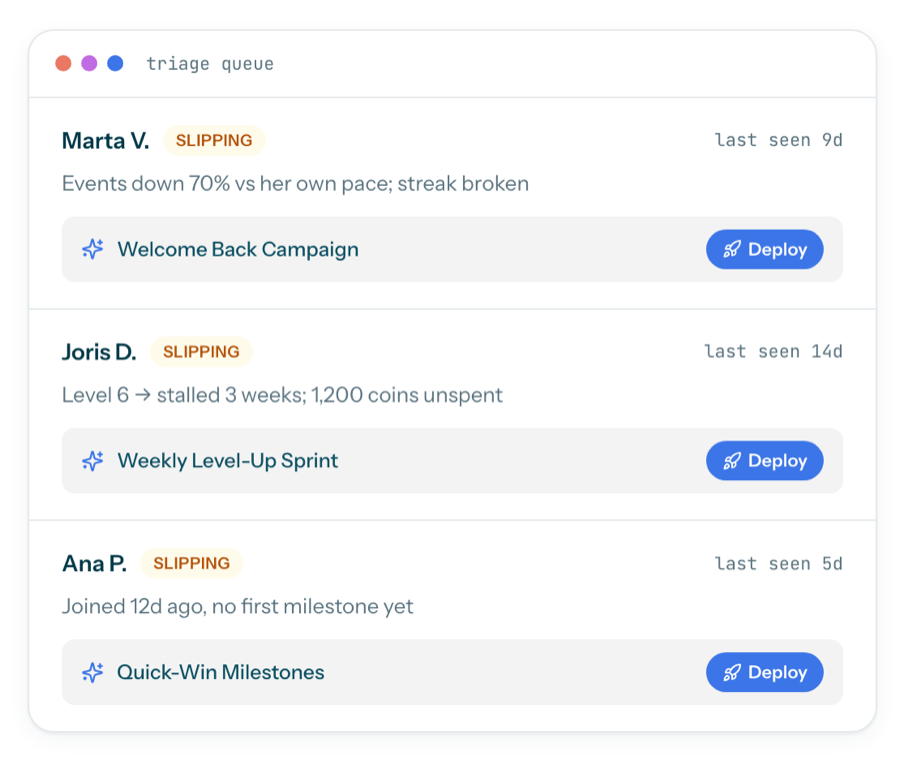
A churn triage queue: each slipping user gets a reason and a suggested play (illustrative data).
Next step: define what "slipping" means for your app and set up one automatic win-back campaign for it.
18. Reward loyalty with tiers and perks
Give your best users something to strive for. Loyalty tiers, a virtual currency and a reward store turn repeat use into visible status. Shared mobility operator EVO Sharing, for example, added an in-app currency and rewards to encourage more rides per user. See the EVO Sharing playbook.
Next step: reward the second and third use, not only the first.
19. Grow through referrals and the network effect
Some apps get better when your friends use them too, like splitting bills or competing on a leaderboard. Referral rewards turn that into growth: Revolut has long used referral incentives because its payment features are more useful when friends are on the app. Forest (formerly HumanForest) ranked e-bike riders by the CO2 they saved, adding a social layer to every ride.


Next step: read our guide to gamified referral programs and reward both the referrer and the new user.
20. Test, measure and iterate
Your users change, and so should your app. Test one change at a time, compare against a holdout group that doesn't get the change, and keep only what moves your north-star metric.
Next step: set up a holdout group for your next engagement feature so you can prove its impact.
How to build your app engagement strategy in 5 steps
- Pick one north-star metric, such as day-30 retention or weekly active users.
- Find your core action: the behaviour that best predicts a user sticking around.
- Map where users drop out between install, activation and habit.
- Choose two or three strategies from this list that target your biggest drop-off point.
- Test, measure against a holdout group, and repeat.
Want the gamification side in more depth? Read our app gamification playbook or the hook model for user retention.
FAQ
What is a mobile app engagement strategy?
A mobile app engagement strategy is a plan to get users to use your app more often and more meaningfully. It combines onboarding, in-app features like gamification, messaging and re-engagement, all measured against one clear goal.
How do you increase mobile app engagement?
Start with the first session: cut onboarding friction and get users to their first win fast. Then build a habit around one core action with streaks, challenges or rewards, send behaviour-triggered messages instead of broadcasts, and catch slipping users early with a win-back campaign.
What is a good DAU/MAU ratio?
It depends heavily on the category: a messaging app is used daily, a travel app a few times a year. Rather than chasing a universal benchmark, track your own ratio over time and compare it with apps in your category.
What is the difference between app engagement and app retention?
Engagement is how actively people use your app; retention is whether they keep using it over time. High engagement usually leads to better retention. For retention-specific tactics, see our app retention strategies.
Put these strategies to work
StriveCloud gives you streaks, quests, leaderboards, rewards and churn prediction in one engine, with no-code widgets to launch fast and an API for deeper integration. Book a 30-minute demo or see customer cases.

Related Posts
App Gamification Strategy: Examples & ROI Guide
Looking to boost your mobile app engagement? Gamification can enhance it by as much as 50%! Because every app is different, it's crucial to have your own personalized gamification strategy that supports your business goals. This article briefly covers the ins and outs of developing your own gamification strategy.